I was trying to modify a table of approx 5 million records setting a field on the table to not allow null values. However, while saving changes in table, I got below error:
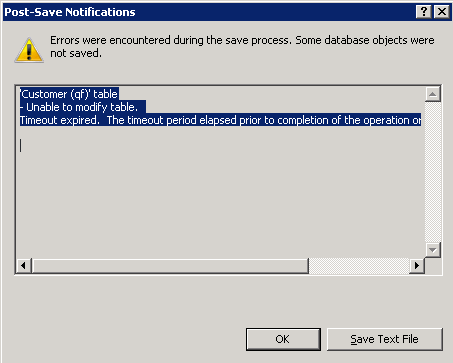
'Account ' table
- Unable to modify table.
Timeout expired. The timeout period elapsed prior to completion of the operation or the server is not responding.
After that I click ok button and I got below error:
User cancelled out of save dialog.
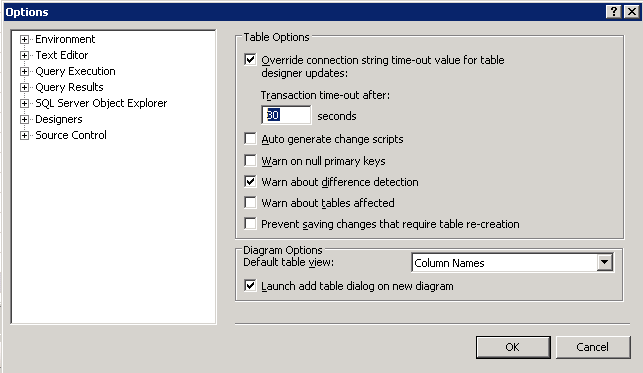
This error is coming because table designer have a default timeout value of 30 secs. And as I am saving a table with huge records, it is taking time more than 30 secs, so above error coming.
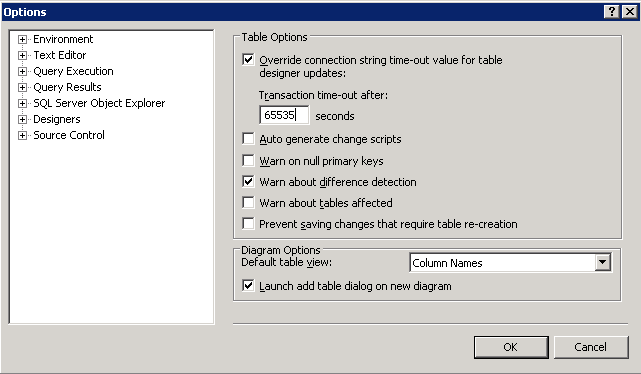
So the solution is to increase the timeout value of designer, (the maximum value for timeout is 65535).
Click on tools menu - Options - Expand designers. Now here change the timeout value in "Table and Database designers" on the right side.
'Account ' table
- Unable to modify table.
Timeout expired. The timeout period elapsed prior to completion of the operation or the server is not responding.
After that I click ok button and I got below error:
User cancelled out of save dialog.
This error is coming because table designer have a default timeout value of 30 secs. And as I am saving a table with huge records, it is taking time more than 30 secs, so above error coming.
So the solution is to increase the timeout value of designer, (the maximum value for timeout is 65535).
Click on tools menu - Options - Expand designers. Now here change the timeout value in "Table and Database designers" on the right side.